AVETMISS Dashboard > AVETMISS Enrolments > Missing Disability
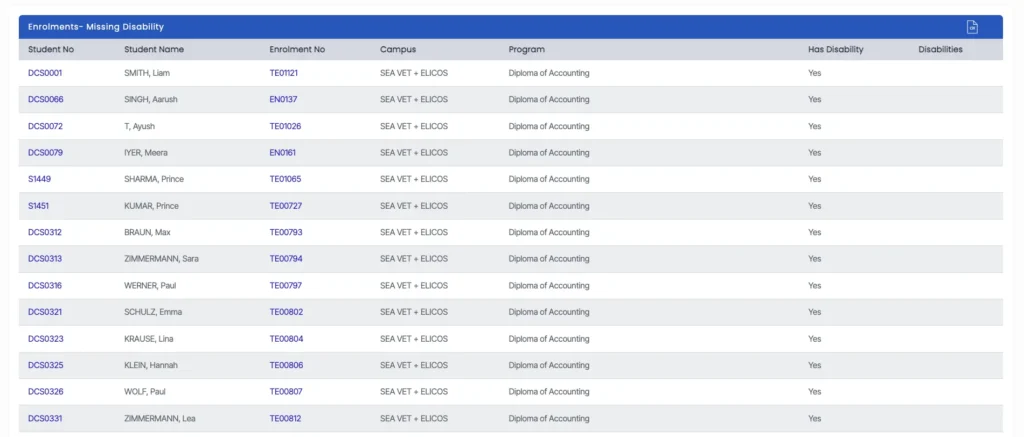
The Missing Disability screen displays enrolments where the “Has Disability” option is selected, but no Disability Type has been specified.
This results in an AVETMISS validation error and must be corrected to ensure compliant reporting.
How to Fix
- Click the Enrolment Number (hyperlink) from the list
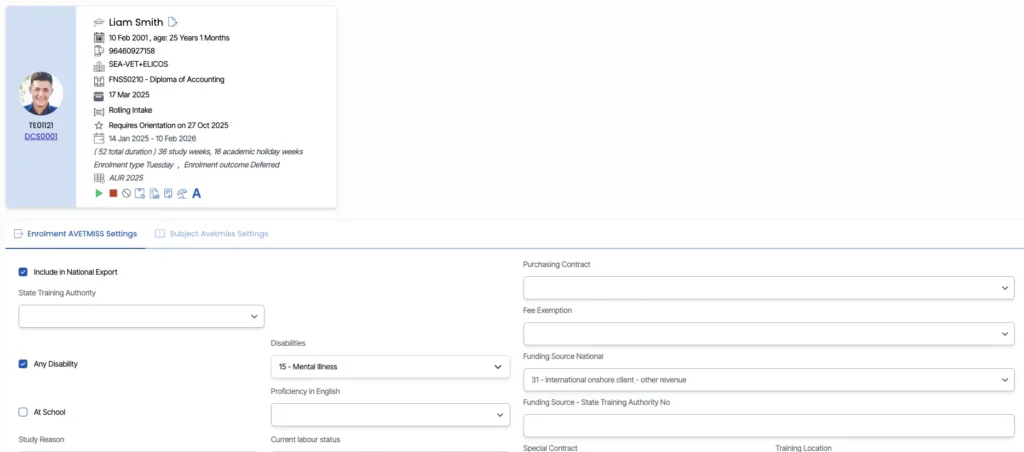
- You will be redirected to the Enrolment AVETMISS Settings screen
- Select the appropriate Disability Type from the dropdown
- Click Save
Why This Matters
When a disability is indicated, specifying the correct type is required for AVETMISS reporting. Missing this information can lead to validation errors during submission.
Next Step
Return to the AVETMISS Dashboard and refresh the data to confirm the issue has been resolved.