Overview
There may be situations where a student is required to undertake a unit that is not part of their enrolled qualification (e.g. a unit from the Diploma of Business added to a Leadership and Management course).
TEAMS allows you to add such units manually by selecting them either from the program or from the full subject list available in the system.
Step-by-Step Instructions
Open the Enrolment Dashboard > Navigate to the Training Plan and Results screen > Click on the Results tab (top/right section). > Select Training Plan and Results.
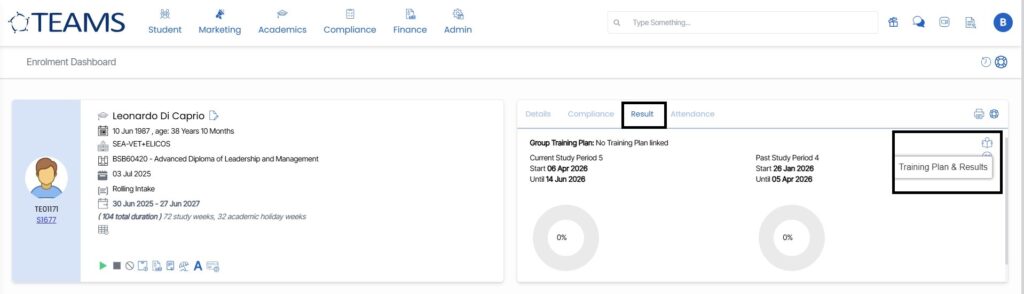
A new window will open showing all current subjects linked to the enrolment.
Add a New Subject
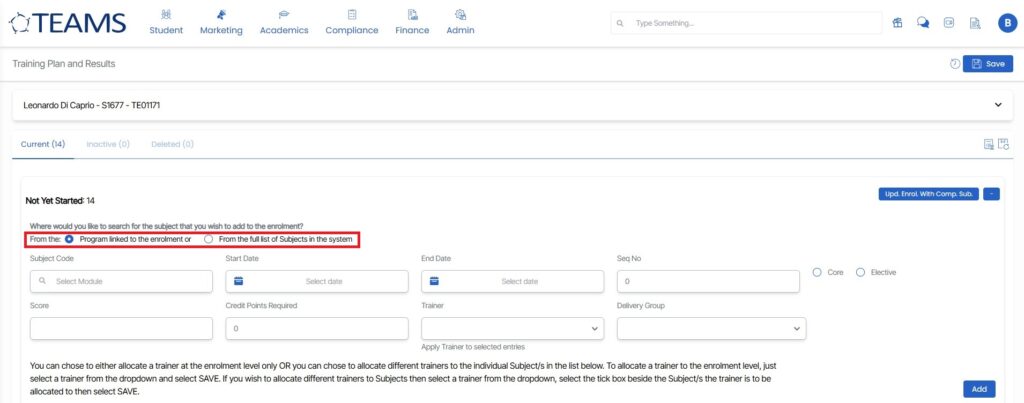
Click the “Add Subject” button (top-right corner of the subject list). You will now see a subject entry panel (as shown in the screenshot), where you can configure the subject details.
You can see there are two types to add a subject from –
Option A: Program Linked to the Enrolment
Use this when the subject is already part of the qualification but not yet added (e.g. elective or non-compulsory unit).
Option B: From the Full List of Subjects in the System
Use this when adding a unit from a different course/program.
This is the option to select when the unit does not belong to the student’s enrolled qualification.
Complete the required fields as mentioned below.
- Subject Code
- Search and select the correct unit.
- Start Date & End Date
- Ensure dates align with the student’s training schedule.
- Seq No (Sequence Number)
- Core / Elective Selection
- Choose appropriately based on the training requirement.
- Trainer
- Assign a trainer if applicable.
- Delivery Group
- Select if your organisation uses delivery group allocations.
- Credit Points Required
Leave as default unless specified by compliance requirements.
Save the Subject
Click Add to include the subject.
Ensure you Save any trainer allocations if applied.
Once completed, the additional unit will appear in the student’s training plan and can be managed like any other subject, regardless of its original program.