We’re excited to introduce the latest TEAMS update, packed with powerful enhancements to streamline workflows, boost communication, and provide clearer insights across your operations.
Highlights of this release
- Transfer Enrolment
- Remove Subject/UoS
- Restrict Financials for Trainers
- Relink Agent (% Commission template)
- New Columns in Agent Payment Report
- New field on Commission Payment Screen
- Sort by Option on Enrolment Result Listing
Transfer Enrolment
A new Transfer Enrolment checkbox has been added to the Edit Enrolment screen in TEAMS.
This checkbox should be selected when a student has transferred from another education provider in Australia. Once selected, the enrolment is flagged as a transfer enrolment, and the status is displayed on the Enrolment Dashboard Profile tile next to the Edit Enrolment icon.
This enhancement makes it easy to identify transfer students and helps finance and administration staff recognise enrolments where agent commission may not be payable under applicable government requirements. Click here for more information
Only select this checkbox for enrolments that meet the relevant transfer student criteria. If it is not selected, the enrolment will continue to be treated as a standard enrolment with no transfer indicator displayed.
Remove Subject/UoS
We’re pleased to introduce the new Remove Subject/UoS feature in TEAMS, allowing users to remove multiple Subjects or Units of Study from multiple enrolments in a single process.
Previously, users had to remove Subjects or Units of Study from each enrolment individually. With this enhancement, users can now filter enrolments, select the required Subjects or Units of Study, review a preview of eligible and ineligible records, and complete the removal in bulk. Only Subjects or Units of Study with a result of Blank or NYS can be removed.
This enhancement reduces manual effort, saves time, and streamlines managing multiple enrolments.
Restrict Financials for Trainers
We’re pleased to introduce a new enhancement in TEAMS that allows colleges to restrict trainers’ access to student and enrolment financial information.
Previously, trainers with access to student or enrolment records could also view the related financial details. With this enhancement, colleges can link a TEAMS user account to a trainer record, ensuring trainers continue to access only their assigned students and enrolments while financial information remains hidden.
This enhancement provides greater control over sensitive financial data, improves privacy, and ensures financial information is accessible only to authorised users.
Relink Agent (% Commission template)
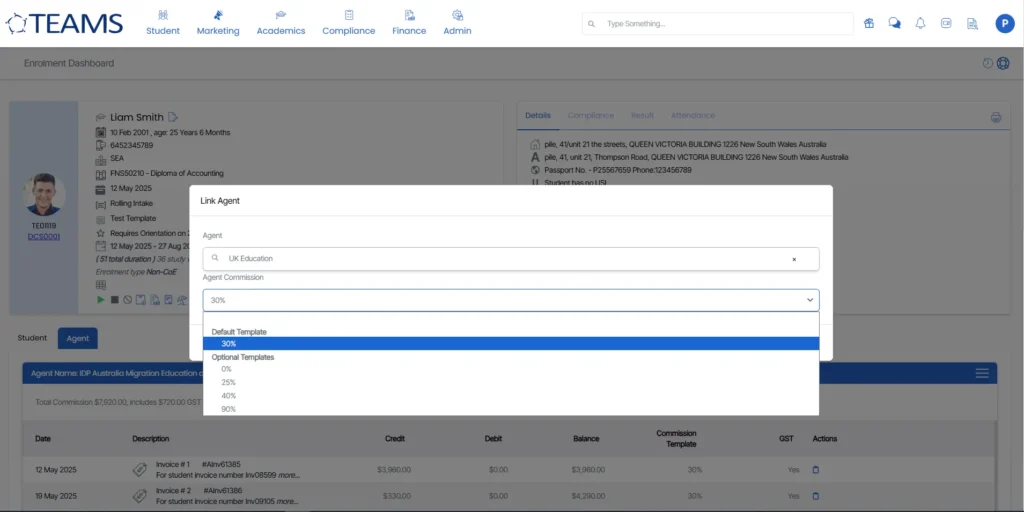
We’re pleased to introduce a new enhancement to the Enrolment Dashboard that provides greater flexibility when linking or relinking an agent to a student enrolment.
Previously, when an agent was linked or relinked, TEAMS would automatically apply the agent’s default commission template. With this enhancement, users can now view available commission templates and choose the appropriate commission structure during linking or relinking.
Users can select either the agent’s default commission template or an alternative commission template, ensuring the correct commission structure is applied to each enrolment.
This enhancement provides greater flexibility in commission management, helps accommodate different commission arrangements, and ensures the appropriate commission template is applied when linking or updating an agent in TEAMS.
New Columns in Agent Payment Report
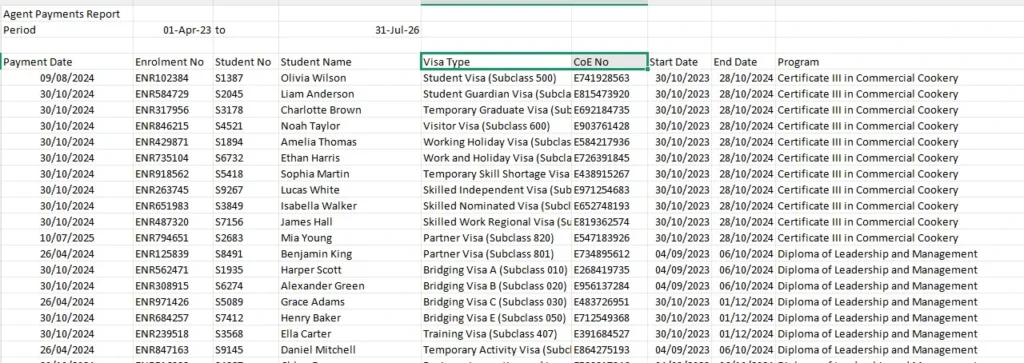
We’re pleased to introduce a new enhancement to the Agent Payment Report that provides greater visibility into student information when reviewing commission payments.
Previously, the Agent Payment Report did not include the Visa Type and CoE Number fields, requiring users to refer to the student profile or other reports to access this information. With this enhancement, both Visa Type and CoE Number have been added as new columns in the Agent Payment Report.
This enhancement provides agents and finance teams with easier access to key student information, reduces the need to cross-reference multiple screens or reports, and improves the efficiency of reviewing and processing agent commission payments.
New field on Commission Payment Screen
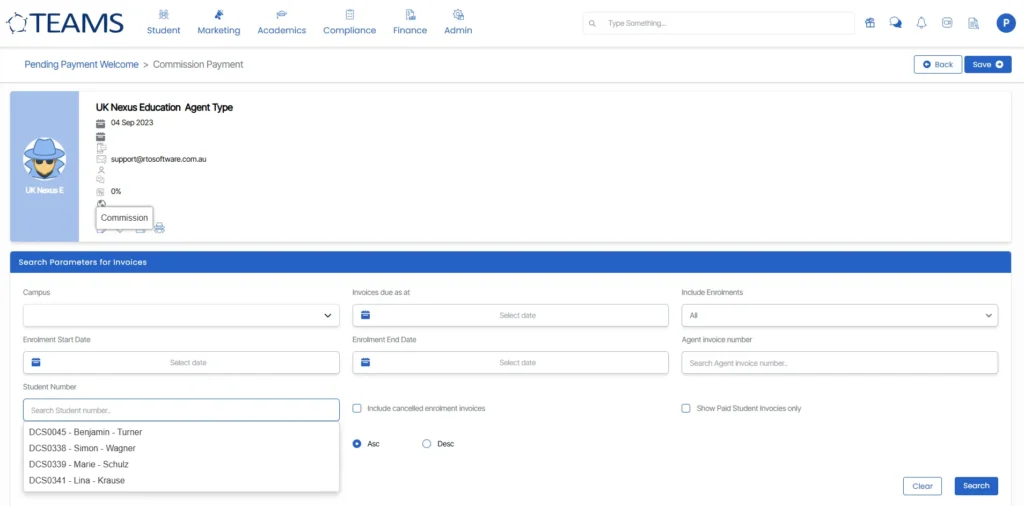
We’re pleased to introduce a new enhancement to the Commission Payment screen that makes it easier to locate commission records for a specific student.
Previously, users had to manually search through commission records or apply multiple filters to find a student’s commission details. With this enhancement, a new Student Search field has been added to the Commission Payment screen, allowing users to quickly search for a student by name and display only the relevant commission records.
This enhancement streamlines the commission payment process, reduces the time spent searching through large volumes of data, and improves overall efficiency when reviewing or processing agent commission payments.
Sort by Option on Enrolment Result Listing
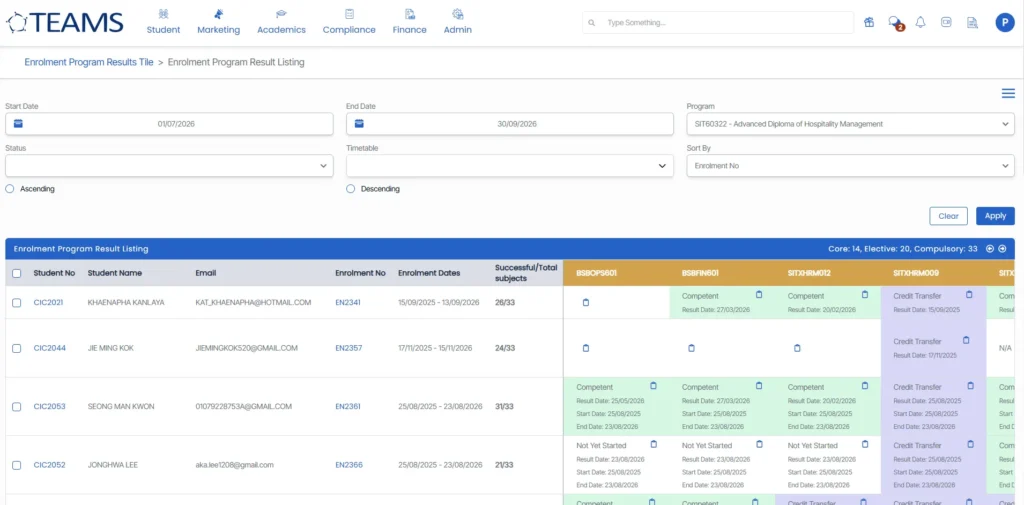
A new Sort By option has been added to the Enrolment Result Listing screen in TEAMS, making it easier to organise and review enrolments.
Previously, users could filter enrolments by date range but could not sort the results. With this enhancement, enrolments can now be sorted in ascending or descending order by Student No. or Enrolment No.
This enhancement improves navigation through large result sets, helps users quickly locate records, and makes enrolment management more efficient by presenting information in a clear, organised order.