Compliance > AVETMISS Subject > Field of Education Missing
The Field of Education Missing alert identifies subjects that do not have a Field of Education assigned an important classification required for AVETMISS reporting and must match the official classification published on training.gov.au
To resolve this
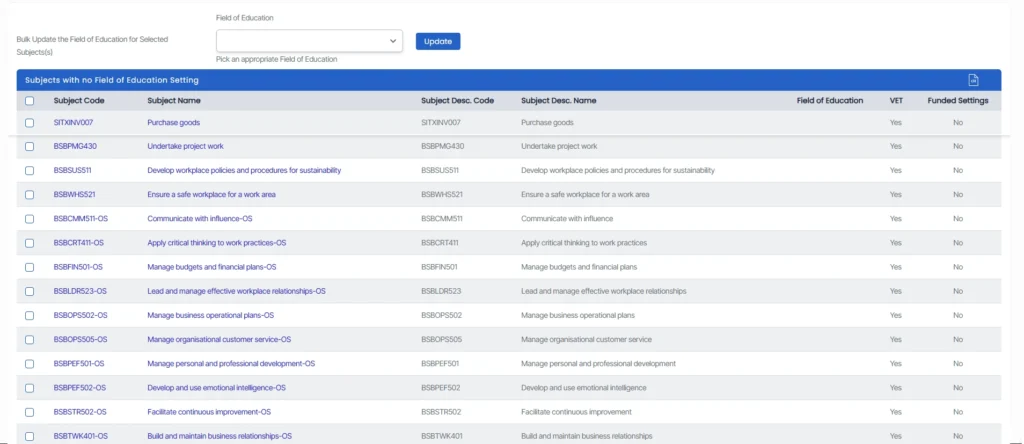
- Click on the count in the AVETMISS – Subjects Tile against the Field of Education Missing to access the list of subjects missing the Field of Education.
- It will redirect you to the subjects missing the Field of Education Listing Screen. There, you can view all the subjects that have a missing Field of Education.
You can update the Field of Education in two ways:
- Click on a subject code to open the Subject Entry screen, then select the correct Field of Education from the dropdown.
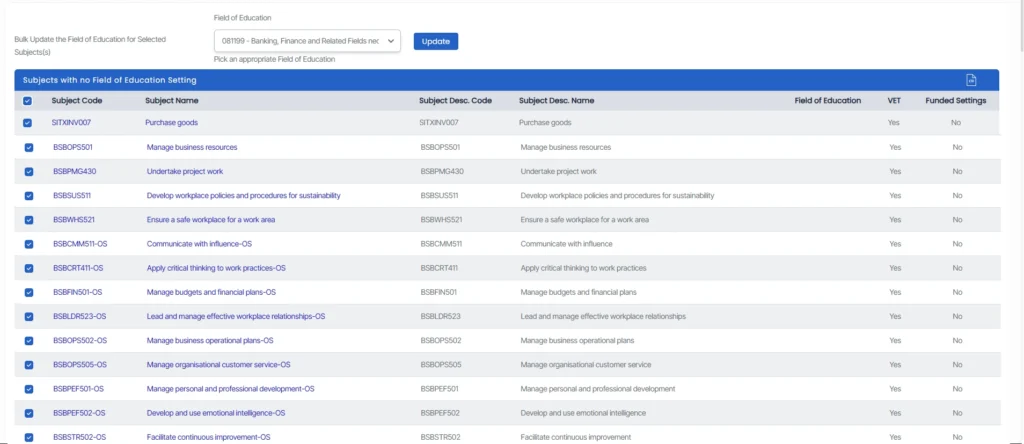
- Select multiple subjects using the checkboxes and apply a bulk update by choosing the correct field from the dropdown.
Click the Update button to save your changes.
Ensuring the Field of Education is correctly assigned improves the accuracy of AVETMISS classification and funding alignment.