Compliance > AVETMISS Program> Nominal Hours Missing
The Nominal Hours Missing alert indicates that one or more programs do not have their required nominal hours entered. Nominal hours are required for AVETMISS reporting and must reflect the official hours published on training.gov.au for each qualification or accredited course.
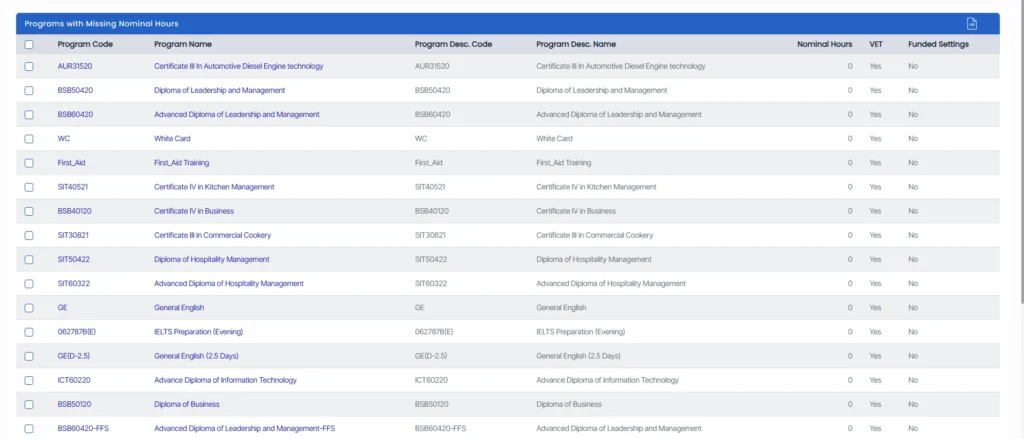
To resolve this:
- Click the alert count to view all programs missing nominal hours. Select a program from the list — this opens the Program Entry screen.
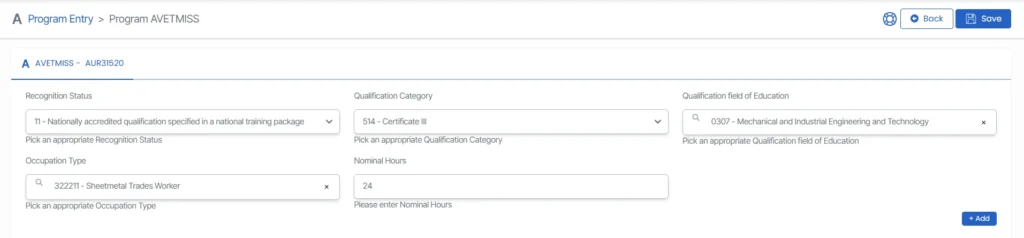
- From there, access the AVETMISS Settings via the burger menu.
- In the Nominal Hours field, enter the appropriate nominal hours for each program based on the official training requirements.
- After entering the hours, make sure to save the changes. Ensuring all programs have accurate nominal hours populated helps maintain compliance with national reporting standards.
Ensuring all programs have complete and accurate nominal hours prevents submission errors and strengthens the overall integrity of your organisation’s reporting data.