Marketing > Marketing Dashboard > Summary Tile
The summary tile gives information about new enquiries and pending applications, also a user can create new enquiries/applications from the tile.
How to use
 This icon will allow you to refresh the specific tile.
A user can change the date range from the Calendar given in the top right corner of the tile to fetch the required data.
The + button is a hyperlink from where a user can create New Enquiries and New Applications. The count adjacent to the application is a hyperlink that shows a listing screen of pending applications
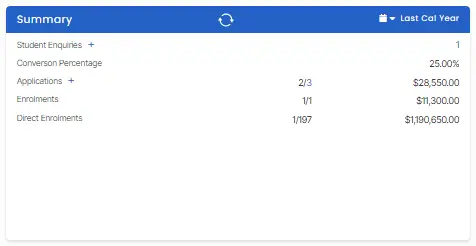
The list can be described as written below:
Student Enquiries: The total number of enquiries received directly from students (Count: 2) is a hyperlink.
Agent Enquiries: The total number of enquiries received from agents (Count: 2) is a hyperlink.
Conversion Percentage: The rate at which enquiries are converting into an outcome (Value: 37.50%).
Applications: The status and financial value of applications. The count written 2/3 is a hyperlink to the application listing screen.
Enrolments: The status and financial value of overall enrolments.
Direct Enrolments: The status and financial value of enrolments that were not received via an agent.