Main Dashboard > Admin > Webforms
The Webforms feature in TEAMS allows you to create customised online forms to collect enquiries, applications, and information from students or agents.These forms streamline data collection, improve accuracy, and connect directly with your TEAMS database.
The Webform Welcome Screen displays a list of all previously created webforms. To access this screen, navigate to the “Webform” option under the Admin tab.
Listing Grid
In the Listing Grid, you can view all existing web forms. Columns include the Webform Name, Webform Title, Webform Type, Last Modified On, Last Modified By, Active and Actions.
You can select +Webform to add the new web form to the system.
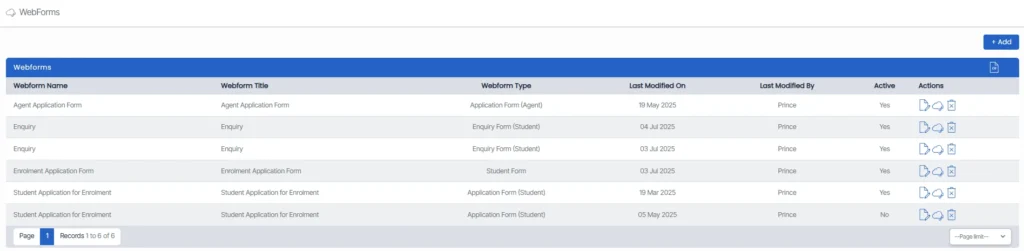
Click on the edit  icon in the listing screen to edit the web form. Click on the delete
 icon to delete a web form.
Click on the webform link  to get a direct and an instant access to the corresponding webform