We’re excited to introduce the latest TEAMS update, packed with powerful enhancements to streamline workflows, boost communication, and provide clearer insights across your operations.
Highlights of this release
- Financial Dashboard Changes
- Warning for Parchment Issue Date
- Burger Menu on Training Plan and Results Screen
- New Notification Bell Icon
- Applicant Notes on Applicant Dashboard
- New Sort by option on Continuing Listing Screen
- Document Log Background Enhancement
Financial Dashboard Changes
We’re excited to introduce new enhancements to the Financial Dashboard in TEAMS, providing clearer financial visibility and improved receivables tracking. The updated dashboard now includes enhanced financial summary tiles, tuition-specific insights, and improved overdue payment monitoring.
A new Receivables Breakdown section visually displays current and overdue invoices across multiple ageing periods, the donut chart, making financial data easier to interpret at a glance.
Additionally, the Upcoming Payment Dates section provides visibility of invoice amounts due over the next 15 days, along with associated student counts and total upcoming payments.
These enhancements are designed to simplify financial monitoring and improve overall reporting visibility within TEAMS.
Warning for Parchment Issue Date
We’re pleased to introduce a new enhancement in TEAMS that improves validation during the Parchment issuance process.
TEAMS will now display a warning message if the selected Parchment Issue Date falls on a public holiday. This feature is available during certificate report generation and while issuing a parchment date from the Qualification Information tile.
Please ensure public holidays are properly configured in your TEAMS site for this feature to function correctly.
Burger Menu on Training Plan and Results screen
We’re pleased to introduce a new enhancement in TEAMS that improves subject management within the Training Plan and Results screens.
Users can now perform bulk actions using the new Burger Menu option, allowing multiple subjects to be marked as inactive or deleted at once instead of managing them individually.
A confirmation alert will appear before proceeding with either action to help prevent accidental changes.
This enhancement helps simplify subject management and improves overall efficiency within TEAMS.
New Notification Bell Icon
We are excited to introduce a new Notification Bell icon in TEAMS to help users manage student change requests more efficiently.
Whenever a student submits a change request from the Student Portal, a notification count will appear on the bell icon. Users can click the bell icon to view requests and directly access the Student Change Request screen to review, approve, or decline them.
Users can also select “See All Notifications” to view all requests together or click “Mark all as read” if no action is required.
This enhancement improves visibility and streamlines request management within TEAMS.
Applicant Notes on Applicant Dashboard
We have introduced a new enhancement in TEAMS that allows users to add notes for applicants directly from the Applicant Dashboard before the application is converted or accepted.
Once the application is converted, the notes will automatically appear on both the Student Dashboard and the Enrolment Dashboard. After conversion, notes can no longer be updated from the Applicant Dashboard.
This enhancement improves flexibility and streamlines applicant management within TEAMS.
New Sort by option on Continuing Listing
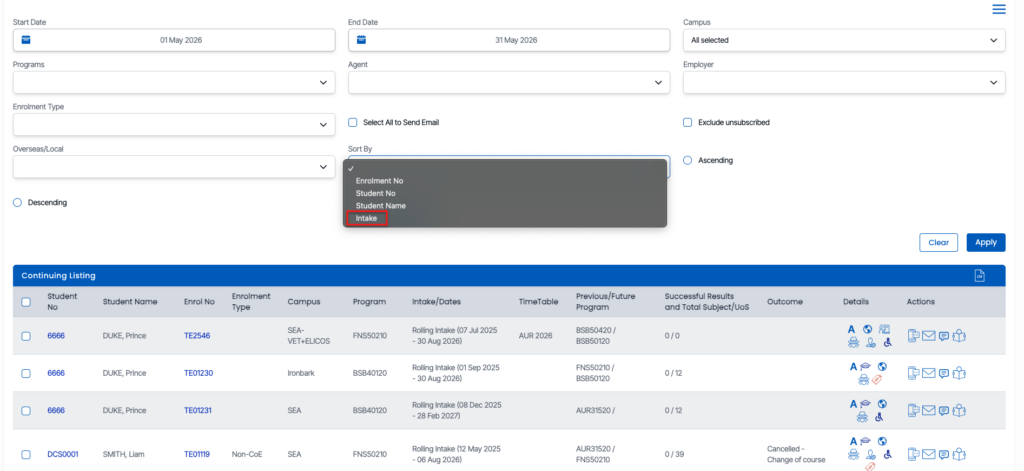
We’re pleased to introduce a new enhancement to the Continuing Tile Listing screen in TEAMS with the addition of the “Sort by Intake” option.
Users can now sort records based on the Intake Code using the Known As Intake value, making it easier to organise and review student data by intake.
This enhancement helps improve data visibility and simplifies intake-based management within TEAMS.
Document Log Background Enhancement
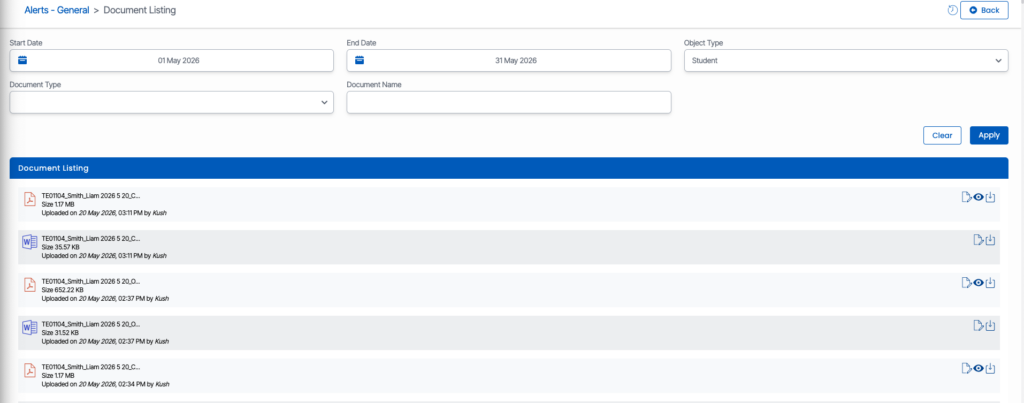
We’re pleased to introduce a new visual enhancement across all Document Listing screens within TEAMS dashboards.
Previously, all document rows displayed with a plain white background. With this update, document listings now use alternating row colours in a striped layout, where one row appears white, and the next appears grey.
This enhancement improves readability, makes document records easier to distinguish, and provides a cleaner viewing experience across all dashboards in TEAMS.